
CatsCradle3.9 - Download
You'll be able to download in few seconds.
Publisher Description
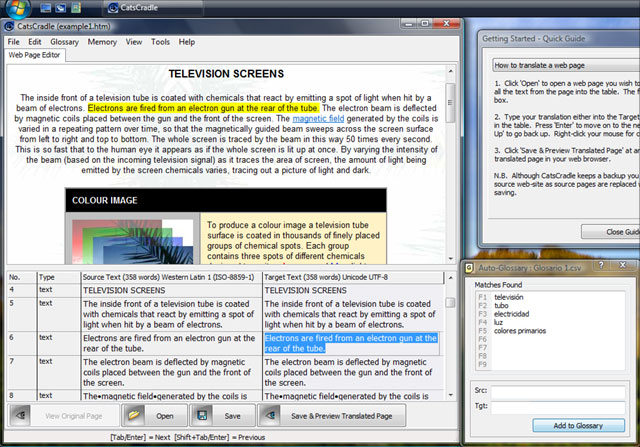
Translate web sites without worrying about the HTML code.
CatsCradle is written for professional freelance language translators and translation agencies - a dedicated web page editor that makes it very easy to translate web pages from one language into another.
CatsCradle grabs all the text that requires translating from a web page, puts it into a built in editor for you to translate alongside, then automatically integrates your translated text back into the web page - leaving all the sensitive HTML code untouched. To check all's going smoothly you can instantly preview your work in progress in a web browser at the click of a button. There's even a real-time view where you can see the web page evolving as you translate. And it's free!
Special Features Include:
- A multilingual GUI in 13 languages (Afrikaans, Brazilian Portuguese, Dutch, French, German, English, Hungarian, Italian, Japanese, Polish, Russian, Spanish and Ukrainian).
- Built in Glossary that can suggest appropriate words and phrases while you are translating.
- Built in Translation Memory System.
- Project file catalogue with word count (can produce word counts for whole folders of web pages).
- As well as web pages CatsCradle can handle .hhc and .hhk help contents and index files, so it's suitable for translating .chm help files too.
About CatsCradle
This HTML Tools program is available in English, Afrikaans, Dutch, French, German, Hungarian, Italian, Japanese, Polish, Portuguese, Russian, Spanish, Ukrainian. It was last updated on 29 September, 2026. CatsCradle is compatible with the following operating systems: Windows.
The company that develops CatsCradle is Stormdance. The latest version released by its developer is 3.9.
The download we have available for CatsCradle has a file size of 1.0 MB. Just click the green Download button above to start the downloading process. The program is listed on our website since 2011-01-19 and was downloaded 0 times. We have already checked if the download link is safe, however for your own protection we recommend that you scan the downloaded software with your antivirus. Your antivirus may detect the CatsCradle as malware if the download link is broken.
How to install CatsCradle on your Windows device:
- Click on the Download button on our website. This will start the download from the website of the developer.
- Once the CatsCradle is downloaded click on it to start the setup process (assuming you are on a desktop computer).
- When the installation is finished you should be able to see and run the program.
Program Details
General
System requirements
Download information
Pricing
Version History
version 3.9
posted on 2011-01-19
Full Unicode UTF-8 support, Japanese GUI option, Encoding converter tool, Multilingual spellchecker
Disclaimer
External Download
We do not host CatsCradle on our servers. We did not scan it for viruses, adware, spyware or other type of malware. This app is hosted by the software publisher and passed their terms and conditions to be listed there. We recommend caution when installing it.
The external download link for CatsCradle is provided to you by apps112.com without any warranties, representations or guarantees of any kind, so access it at your own risk.
If you have questions regarding this particular app contact the publisher directly. For questions about the functionalities of apps112.com contact us.
